

Answer in 60 seconds. Open NotebookLM (free, Google account), use the “Search the web” feature with your target keyword, import the top 10-15 results, then paste three prompts: a gap-table prompt, a cited-receipts prompt, and an outline prompt. You get a structured table of what the SERP covers, a list of topics nobody covered, source-linked facts you can use, and an SEO-friendly outline. Total active time: about 10 minutes. NotebookLM is Google’s free research notebook. Every answer is based only on the pages you upload, no outside guessing.
The job I hated most about writing for SEO was opening the top 20 ranking pages for a keyword, reading them all, taking notes on what they cover, then trying to figure out what the SERP forgot.
That’s a 3-4 hour grind. It’s also the most important hour of the whole article. The gap analysis is what separates a piece that ranks from just another average blog repeating what everyone else said.
Last month Google upgraded NotebookLM to Gemini 3. Gemini 3 has a 1 million word memory. That’s enough to dump every one of those 20 pages into one workspace. The AI holds all of them in mind at the same time. Same chat, same memory, all 20 pages. You ask questions across the entire SERP without re-uploading anything.
The whole research now takes me about 10 minutes. Free tool. Here’s the exact run.
Key Takeaway: NotebookLM with Gemini 3 holds 20 SERP pages in working memory at once. You ask the whole stack questions in one chat instead of opening 20 tabs and trying to keep notes.
The 4-step workflow
I tested this live while writing this piece, so the workflow below is from a real run, not a mockup. Target keyword: “claude vs chatgpt for writing 2026” (a real comparison query I might write about later).
Step 1, open NotebookLM and start a new notebook
Go to notebooklm.google.com. You sign in with a free Google account, that’s it. The home page shows your old notebooks plus a Featured strip from publishers (skip those, they’re demo content).
Click + Create new in the top-right.
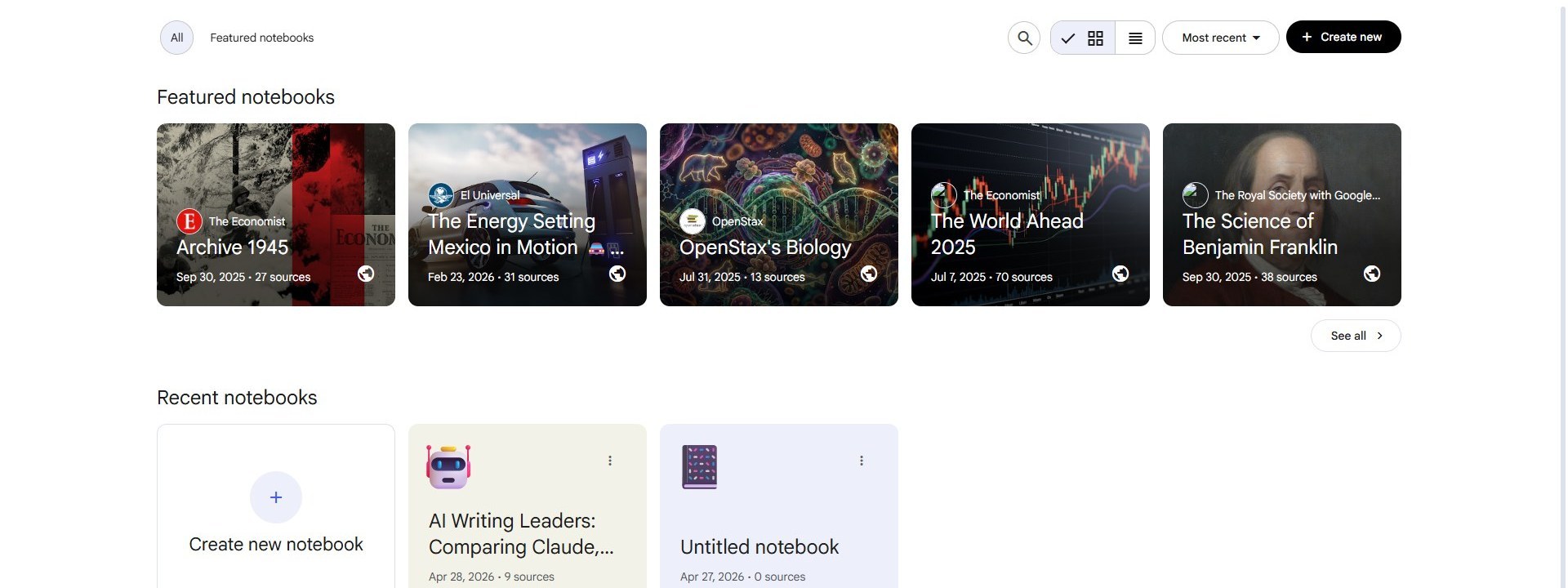 The home dashboard. Old notebooks under Recent. Featured at top is a content strip you can skip.
Step 2, dump the top 10 SERP results into the notebook
A new notebook opens with a popup in the middle. Three things to spot:
- Search the web for new sources input. This is where you type your keyword.
- Web button (lets you scope to certain site types if you want).
- Fast Research button. Fast is the default. It surfaces 8-12 strong results per query.
Type your target keyword. I typed claude vs chatgpt for writing 2026 and clicked the blue arrow.
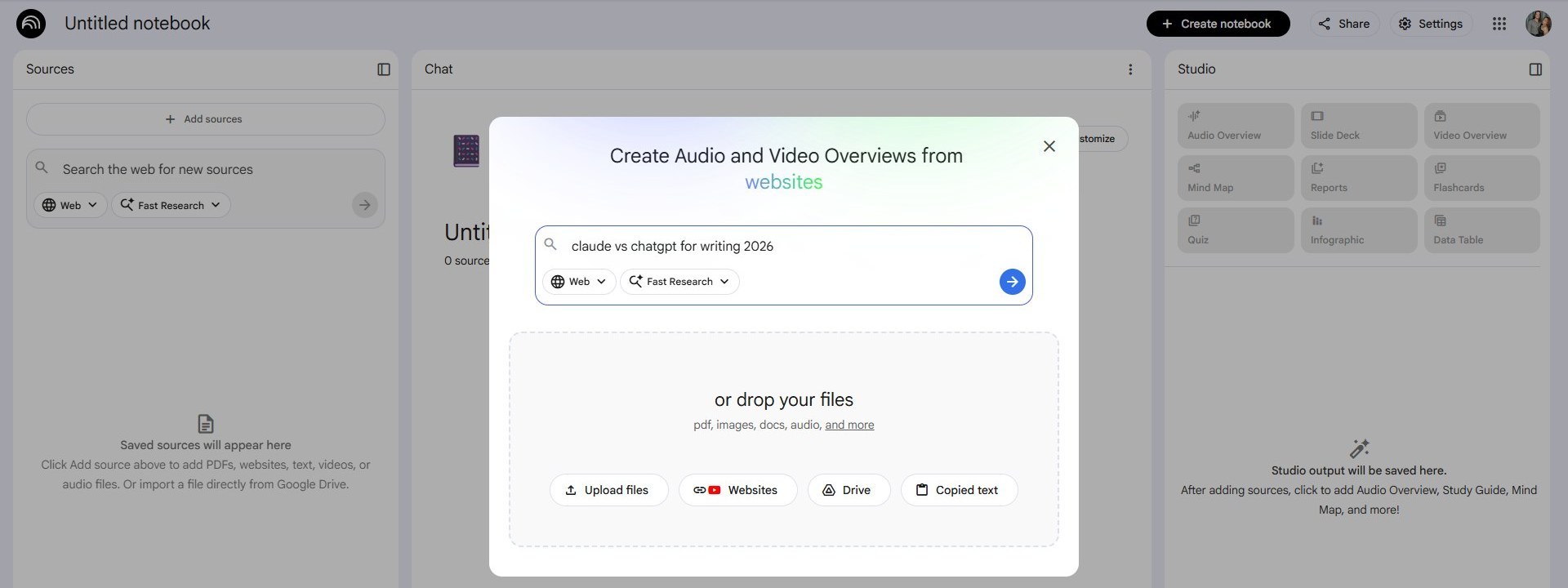 The popup with my keyword typed in. The arrow on the right starts the web search.
Wait 10-15 seconds. NotebookLM scans the SERP and shows you what it found. You’ll see “Researching Websites…” with a spinner, then Fast Research completed! with a list of suggestions.
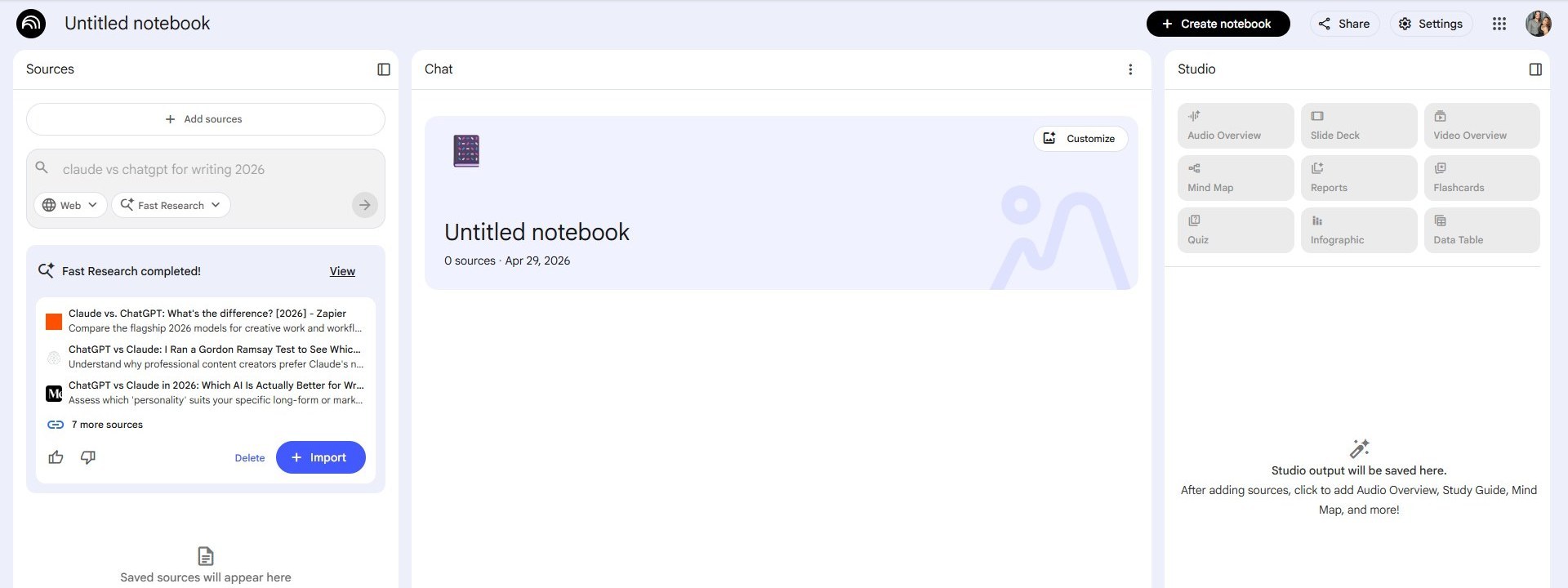 The previews. Three sources shown, “7 more sources” hidden behind the link. Click Import to add them all.
Click + Import. NotebookLM reads all 10 results, remembers each one (you’ll see a spinner per source for a few seconds), and the chat panel auto-titles your notebook based on the topic. My run got titled “AI Performance and Long-Form Writing Tools 2026” without me asking. The chat panel also writes a short summary that pulls together what’s across the 10 sources.
That short summary alone is the strongest 30 seconds of “what is this SERP about” reading you’ll do all day.
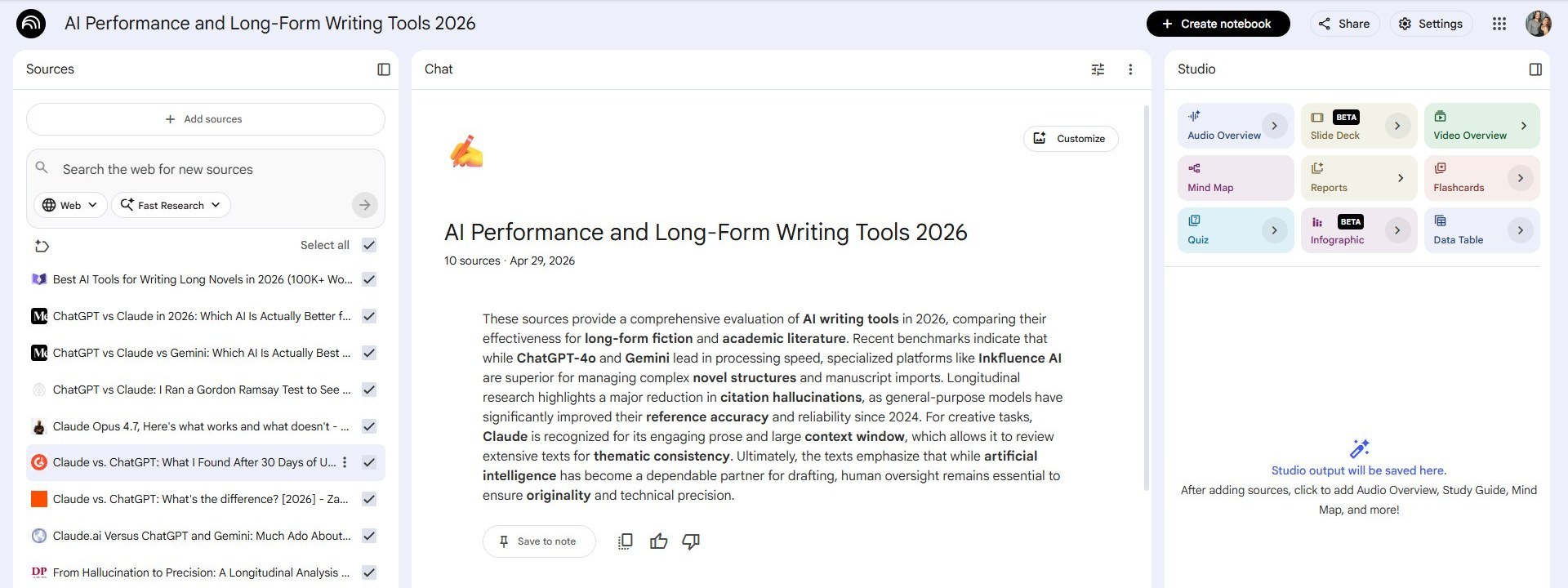 All 10 sources imported and read. Studio panel on the right wakes up with all the things you can build from this set. The summary in the middle is auto-generated.
The whole step from typing keyword to a notebook full of read sources took about 90 seconds for me.
Step 3, ask for the gap
This is the prompt that does the actual work:
Build a table with three columns: topic covered, primary keyword used, depth (shallow / medium / deep). One row per source. Then below the table, list the topics that fewer than three sources cover. Those are the content gaps.
Paste it into the chat box at the bottom. Send.
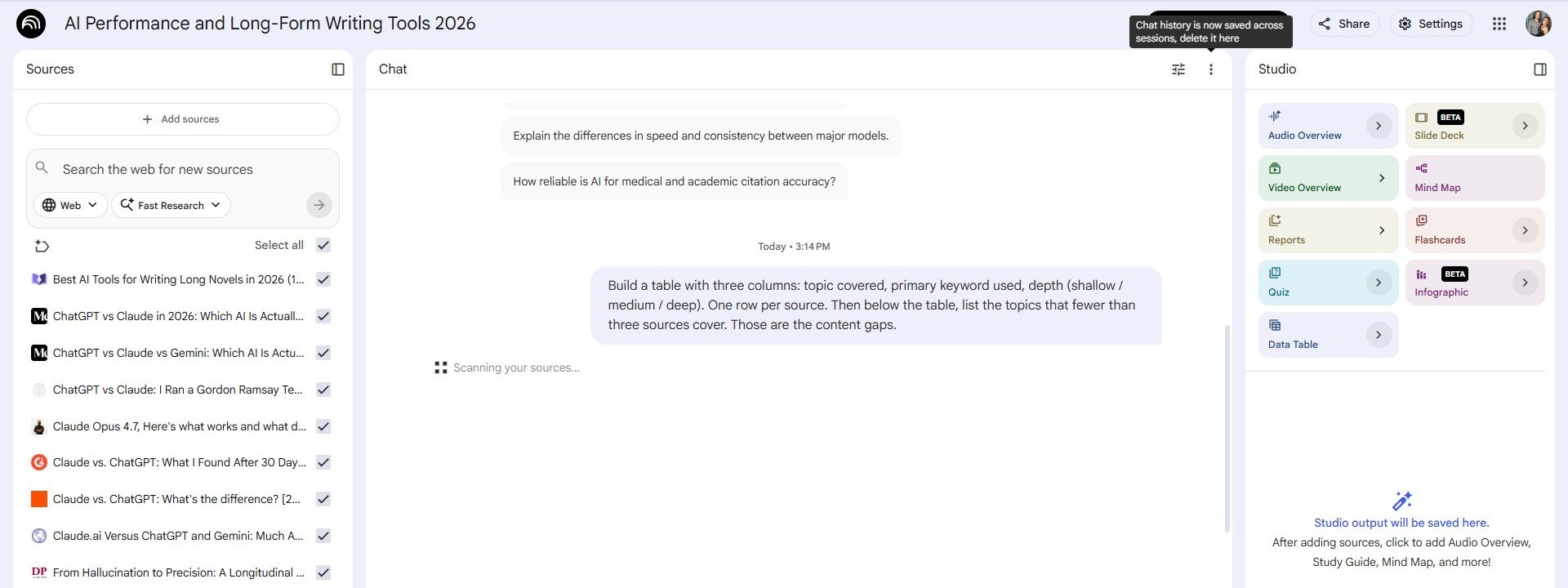 The exact gap prompt in the chat box. NotebookLM only answers from your imported sources. No outside guessing.
Wait 30-60 seconds. NotebookLM reads every source in parallel and gives you a real table back. Rows and columns you can copy straight into your draft. One row per source. Columns filled with the topic each piece covers, the primary keyword they targeted, and how deeply they treated it.
Below the table, you get the gap list. Topics fewer than three sources cover. That’s your unfair-advantage outline. The angles every other writer in the SERP missed.
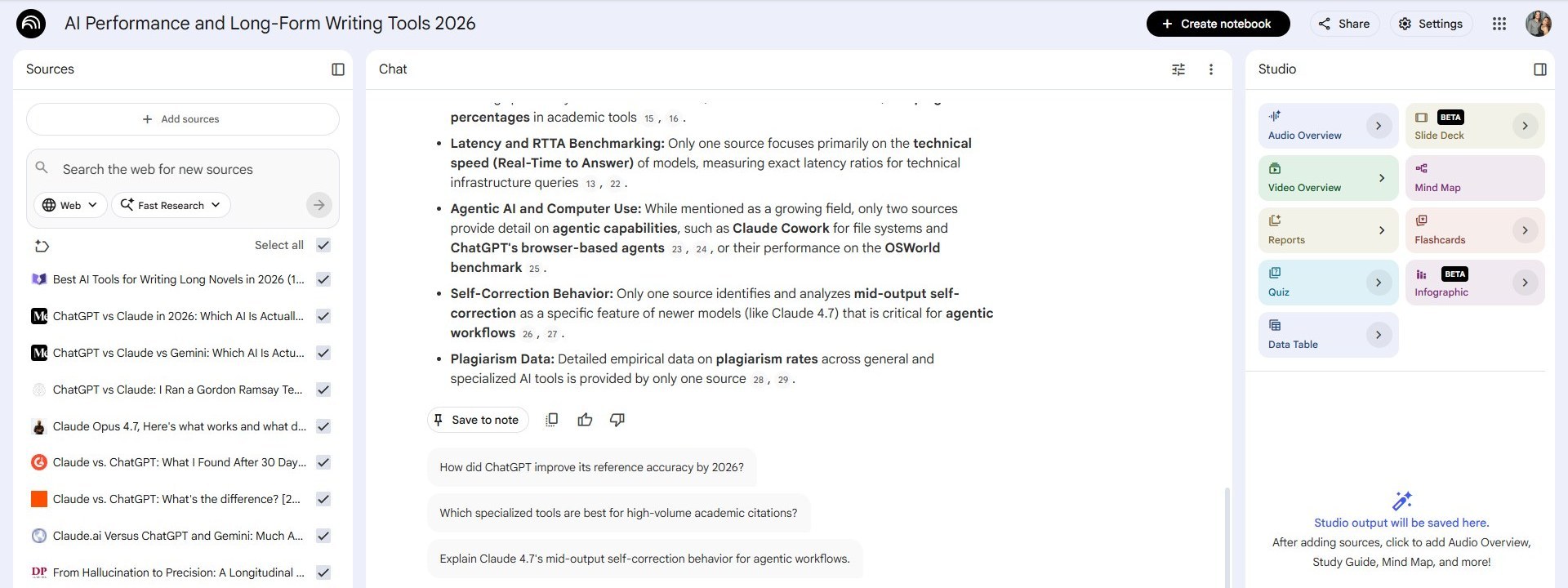 The structured table. Each row links back to the source. The gap list below names topics almost nobody covered.
For my “claude vs chatgpt for writing” run, the gaps it found were things like which model is actually better when you’re writing a whole novel, how each one handles “I’m stuck” prompts, and whether either of them stays in character over a long chat. None of the 10 sources covered any of those with depth.
Key Takeaway: The gap list is the only output you really need from NotebookLM. Everything else is bonus. If you have 9 cited gap topics, you have 9 angles your competitors missed.
Step 4, pull the receipts and the outline
Two more prompts close out the research.
Prompt for receipts:
For each gap, find the most credible study, dataset, or quote from the sources that supports writing about it.
NotebookLM shows you the exact page each fact came from. Click the citation chip next to any sentence and the source preview opens with the exact quote highlighted. This is the part standard ChatGPT cannot do (yeah, it makes things up). NotebookLM only answers from what you uploaded.
Prompt for the outline:
Build an SEO-friendly outline. H2s for each topic and H3s for subtopics. Then a target word count per section based on what’s ranking. Include 5 FAQ candidates.
You get a structured outline with target word counts based on what the ranking competitors are doing. Then I write the words from that outline myself. NotebookLM can draft the body too, up to about 1,200 words at a time. But the prose is generic ai language, so don’t use it as is. Use it for outlines and tables. Write the actual sentences yourself.
The catch (every workflow has one)
Source quality is everything. If you import 20 mediocre pages, you get mediocre gap analysis. The tool is only as smart as what you feed it. When the SERP for your keyword is full of listicles from 2019 and Quora answers, the gaps NotebookLM finds will reflect that thin set. Skim the source titles before you Import, deselect the obvious filler and keep the real ones.
The other catch worth naming: NotebookLM links back to the page you imported, but the page itself can be wrong. NotebookLM will faithfully repeat a bad stat from a sloppy blog. The citations get you to the original sentence. Your job is still to verify the underlying study before you put a number in your article. I covered the same trust problem in why the smartest AI models lie the most. The same skepticism applies here.
NotebookLM vs the alternatives
| Method | Time to a usable outline | Citations? | Cost | Tabs you keep open |
|---|---|---|---|---|
| Open 20 tabs, take notes by hand | 3-4 hours | Manual copy-paste | Free | 20+ |
| Paste URLs into ChatGPT one by one | 30-45 min | Sometimes, often hallucinated | $20/mo for Plus | 1 |
| NotebookLM with Gemini 3 | ~10 minutes | Linked to source page | Free | 1 |
ChatGPT can read URLs. It cannot hold all 20 in one chat the same way NotebookLM can. And its answers are not always grounded in the page you sent.
What I actually got from the live run
For the “claude vs chatgpt for writing 2026” run I just demoed, here’s what 10 minutes got me, and what the same 10 minutes can get you:
- 10 imported sources I could ask questions of as one stack
- A 10-row table showing which topics each source covered and how deep they went
- A gap list naming topics nobody owned
- An auto-generated summary paragraph (a free first draft of my opener)
- Source-linked facts for each gap topic
The actual draft session afterwards was the fastest I remember. Most of those 10 minutes were NotebookLM thinking while I was answering email in another tab.
When NotebookLM doesn’t replace what you have
NotebookLM doesn’t replace Claude Opus 4.7 or ChatGPT for actual writing. It’s the research layer that runs before you sit down to write. The drafting still happens in Claude for me, with the gap list and source links from NotebookLM dropped in for reference.
What NotebookLM is good for:
- A week later, you can come back and ask the same questions of the same set of pages. The notebook stays put.
- Each citation links back to the page it came from. You can open it with one click instead of digging through old tabs.
- The auto-summary saves you the 20 minutes you usually spend skimming the top results to figure out what the topic is even about.
- You get tables back. Rows and columns you can copy straight into your draft.
What it is not good for:
- Your own take on the data. NotebookLM only knows what you uploaded, that’s all it sees. The gaps it finds and the facts it surfaces are real, but the angle on those gaps still has to come from you.
- Fresh news. The Fast Research crawl pulls public-web results, but it’s not real-time. For breaking AI news I cover the model decision card and stay closer to the source.
The workflow as a checklist
Here’s the whole thing again, in five steps:
- Go to notebooklm.google.com, click + Create new
- Type your keyword in the popup, click the arrow, click + Import when Fast Research finishes
- Paste the gap-table prompt, get the table and gap list
- Paste the receipts prompt, click citations to verify
- Paste the outline prompt, then write the words yourself
Box score:
- Total time: about 10 minutes
- Total cost: $0
- Total tabs opened: 1
NotebookLM is free. The Gemini 3 upgrade landed quietly in early 2026, most people haven’t tried it since the old version. If you’ve been opening 20 tabs to research one article, this is the upgrade.
FAQ
Is NotebookLM free for SEO research?
Yes. NotebookLM is free with a Google account. The Gemini 3 upgrade that gives it a 1 million word memory is included. You don’t need to pay or upgrade anything.
How many sources can NotebookLM hold at once?
With Gemini 3, it holds all 20 of your top-ranking SERP pages in working memory at the same time, in one chat. You ask questions across the whole stack without re-uploading.
Does NotebookLM make things up like ChatGPT does?
No. NotebookLM only answers from the pages you upload. Every fact in its answer links back to the exact source page so you can check it. The catch is the source itself can be wrong, so you still need to verify any number you plan to publish.
Can NotebookLM write the article for me?
It can draft up to about 1,200 words, but the prose reads as generic AI language. Use NotebookLM for the outline, the gap analysis, and the source-linked facts. Write the actual sentences yourself.
How is this different from pasting URLs into ChatGPT?
NotebookLM holds the full text of every source in memory at once and links every fact back to the source. ChatGPT can read URLs but cannot hold all 20 in a single chat the same way, and its answers are not always grounded in the page you sent.
Want the prompt templates I use across NotebookLM, Claude, DeepSeek, and ChatGPT? They go out in the Stash newsletter when I have new ones. Sign up at theaistash.com/newsletter, I send something new whenever I find it worth your inbox.